<?xml version="1.0" encoding="utf-8"?>
<feed xmlns="http://www.w3.org/2005/Atom">
	<title type="html"><![CDATA[First Strike Forums — The Walls tutorial]]></title>
	<link rel="self" href="https://forums.fsmod.com/extern.php?action=feed&amp;tid=6277&amp;type=atom" />
	<updated>2007-10-17T15:30:29Z</updated>
	<generator version="1.4.5">PunBB</generator>
	<id>https://forums.fsmod.com/viewtopic.php?id=6277</id>
		<entry>
			<title type="html"><![CDATA[Re: The Walls tutorial]]></title>
			<link rel="alternate" href="https://forums.fsmod.com/viewtopic.php?pid=85534#p85534" />
			<content type="html"><![CDATA[<p>The editor could send them to My Documents\Battlefield 2\Screenshots as thats where they get sent when you use it in game.&nbsp; I doubt it though, you&#039;ll probably have to press it, go into paint and press paint, then save it.</p>]]></content>
			<author>
				<name><![CDATA[Imperial]]></name>
				<uri>https://forums.fsmod.com/profile.php?id=587</uri>
			</author>
			<updated>2007-10-17T15:30:29Z</updated>
			<id>https://forums.fsmod.com/viewtopic.php?pid=85534#p85534</id>
		</entry>
		<entry>
			<title type="html"><![CDATA[Re: The Walls tutorial]]></title>
			<link rel="alternate" href="https://forums.fsmod.com/viewtopic.php?pid=85520#p85520" />
			<content type="html"><![CDATA[<p>I don&#039;t think the editor sends them anywhere.</p><p>Print screen saves your screenshot in your paste thing.</p><p>So you take a screenshot (Prntscrn) then open paint and get the dotted line box right click and press paste. Then redo.</p>]]></content>
			<author>
				<name><![CDATA[TY2D2]]></name>
				<uri>https://forums.fsmod.com/profile.php?id=388</uri>
			</author>
			<updated>2007-10-17T13:11:17Z</updated>
			<id>https://forums.fsmod.com/viewtopic.php?pid=85520#p85520</id>
		</entry>
		<entry>
			<title type="html"><![CDATA[Re: The Walls tutorial]]></title>
			<link rel="alternate" href="https://forums.fsmod.com/viewtopic.php?pid=85491#p85491" />
			<content type="html"><![CDATA[<div class="quotebox"><cite>Lance Haith wrote:</cite><blockquote><p>The &quot;Print Screen&quot; button on top of the Num-Pad. It takes a snapshot of the picture for you to paste in a photo editing software like Adobe Photo shop or Paint (since I&#039;m poor and lack any 133t ninja pirate skills I use paint). </p><p>It does seem that BF2 editor saves a copy of a picture you take but where it saves them to I have no idea....</p><p>Nice tut for the newbies... wall making is a VERY tedious process guys... especially if you want to make them at odd angles.</p><p><em>Another Tip:</em> if you know approximately how many posts and wall parts you want to use you can just align them at their normal positions and select them all to change angles. It might save time but I&#039;m not sure as I dont do that <img src="https://forums.fsmod.com/img/smilies/smile.png" width="15" height="15" alt="smile" /></p></blockquote></div><p>yeah i need to find where editor sends them it seems.... Ages latter/ nup can find where editor sends screen shots your gona have to tell me.</p>]]></content>
			<author>
				<name><![CDATA[RHYS4190]]></name>
				<uri>https://forums.fsmod.com/profile.php?id=1418</uri>
			</author>
			<updated>2007-10-17T08:13:05Z</updated>
			<id>https://forums.fsmod.com/viewtopic.php?pid=85491#p85491</id>
		</entry>
		<entry>
			<title type="html"><![CDATA[Re: The Walls tutorial]]></title>
			<link rel="alternate" href="https://forums.fsmod.com/viewtopic.php?pid=85476#p85476" />
			<content type="html"><![CDATA[<p>Not really, I find I learn most things through trial and error. But silly things like cuting and pasting alluded me entirely so I doubt I would have found that out anytime soon <img src="https://forums.fsmod.com/img/smilies/wink.png" width="15" height="15" alt="wink" /></p>]]></content>
			<author>
				<name><![CDATA[Lance Haith]]></name>
				<uri>https://forums.fsmod.com/profile.php?id=1564</uri>
			</author>
			<updated>2007-10-17T04:39:54Z</updated>
			<id>https://forums.fsmod.com/viewtopic.php?pid=85476#p85476</id>
		</entry>
		<entry>
			<title type="html"><![CDATA[Re: The Walls tutorial]]></title>
			<link rel="alternate" href="https://forums.fsmod.com/viewtopic.php?pid=85475#p85475" />
			<content type="html"><![CDATA[<p>Or.... Even better. Make one piece with adjoining pillar. Rotate them the right way. Then Copy paste them over and over! </p><p>Seriously though, people actually need tutorials for this kinda thing?</p>]]></content>
			<author>
				<name><![CDATA[TY2D2]]></name>
				<uri>https://forums.fsmod.com/profile.php?id=388</uri>
			</author>
			<updated>2007-10-17T04:38:01Z</updated>
			<id>https://forums.fsmod.com/viewtopic.php?pid=85475#p85475</id>
		</entry>
		<entry>
			<title type="html"><![CDATA[Re: The Walls tutorial]]></title>
			<link rel="alternate" href="https://forums.fsmod.com/viewtopic.php?pid=85473#p85473" />
			<content type="html"><![CDATA[<p>The &quot;Print Screen&quot; button on top of the Num-Pad. It takes a snapshot of the picture for you to paste in a photo editing software like Adobe Photo shop or Paint (since I&#039;m poor and lack any 133t ninja pirate skills I use paint). </p><p>It does seem that BF2 editor saves a copy of a picture you take but where it saves them to I have no idea....</p><p>Nice tut for the newbies... wall making is a VERY tedious process guys... especially if you want to make them at odd angles.</p><p><em>Another Tip:</em> if you know approximately how many posts and wall parts you want to use you can just align them at their normal positions and select them all to change angles. It might save time but I&#039;m not sure as I dont do that <img src="https://forums.fsmod.com/img/smilies/smile.png" width="15" height="15" alt="smile" /></p>]]></content>
			<author>
				<name><![CDATA[Lance Haith]]></name>
				<uri>https://forums.fsmod.com/profile.php?id=1564</uri>
			</author>
			<updated>2007-10-17T03:39:35Z</updated>
			<id>https://forums.fsmod.com/viewtopic.php?pid=85473#p85473</id>
		</entry>
		<entry>
			<title type="html"><![CDATA[Re: The Walls tutorial]]></title>
			<link rel="alternate" href="https://forums.fsmod.com/viewtopic.php?pid=85460#p85460" />
			<content type="html"><![CDATA[<p>But i dont know how to get a photo of the map can some one tell me plez <img src="https://forums.fsmod.com/img/smilies/smile.png" width="15" height="15" alt="smile" />&quot;.</p>]]></content>
			<author>
				<name><![CDATA[RHYS4190]]></name>
				<uri>https://forums.fsmod.com/profile.php?id=1418</uri>
			</author>
			<updated>2007-10-17T02:13:36Z</updated>
			<id>https://forums.fsmod.com/viewtopic.php?pid=85460#p85460</id>
		</entry>
		<entry>
			<title type="html"><![CDATA[Re: The Walls tutorial]]></title>
			<link rel="alternate" href="https://forums.fsmod.com/viewtopic.php?pid=85316#p85316" />
			<content type="html"><![CDATA[<p>Not a bad tutorial.&nbsp; You can also in that case probably set the Z to be the same and simply adjust the X. to get it just right.</p>]]></content>
			<author>
				<name><![CDATA[Imperial]]></name>
				<uri>https://forums.fsmod.com/profile.php?id=587</uri>
			</author>
			<updated>2007-10-16T14:09:37Z</updated>
			<id>https://forums.fsmod.com/viewtopic.php?pid=85316#p85316</id>
		</entry>
		<entry>
			<title type="html"><![CDATA[Re: The Walls tutorial]]></title>
			<link rel="alternate" href="https://forums.fsmod.com/viewtopic.php?pid=85303#p85303" />
			<content type="html"><![CDATA[<p>yea - it&#039;s a bad habit..<br />I really missuses Photo-bucket allot.</p>]]></content>
			<author>
				<name><![CDATA[Thomazz]]></name>
				<uri>https://forums.fsmod.com/profile.php?id=1589</uri>
			</author>
			<updated>2007-10-16T12:48:16Z</updated>
			<id>https://forums.fsmod.com/viewtopic.php?pid=85303#p85303</id>
		</entry>
		<entry>
			<title type="html"><![CDATA[Re: The Walls tutorial]]></title>
			<link rel="alternate" href="https://forums.fsmod.com/viewtopic.php?pid=85301#p85301" />
			<content type="html"><![CDATA[<p>cool stuff <img src="https://forums.fsmod.com/img/smilies/tongue.png" width="15" height="15" alt="tongue" /> now how do you take screen shoot thinges of the map your making <img src="https://forums.fsmod.com/img/smilies/tongue.png" width="15" height="15" alt="tongue" /></p>]]></content>
			<author>
				<name><![CDATA[RHYS4190]]></name>
				<uri>https://forums.fsmod.com/profile.php?id=1418</uri>
			</author>
			<updated>2007-10-16T12:37:45Z</updated>
			<id>https://forums.fsmod.com/viewtopic.php?pid=85301#p85301</id>
		</entry>
		<entry>
			<title type="html"><![CDATA[The Walls tutorial]]></title>
			<link rel="alternate" href="https://forums.fsmod.com/viewtopic.php?pid=85297#p85297" />
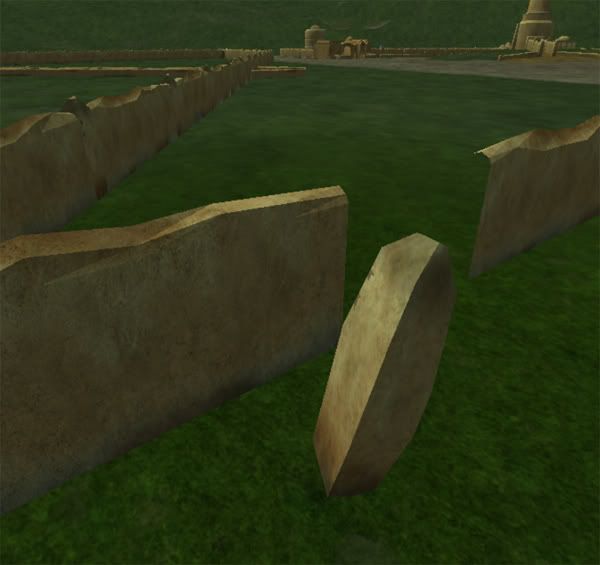
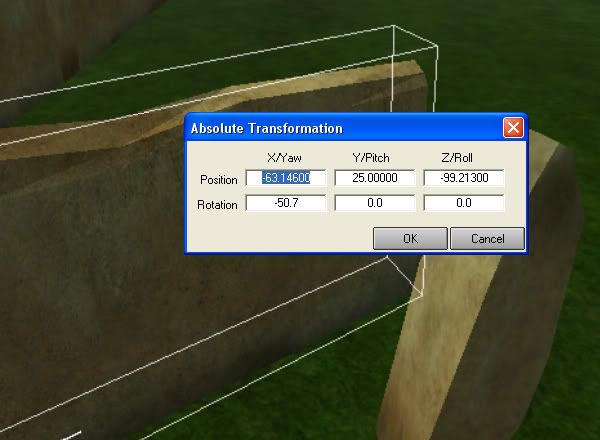
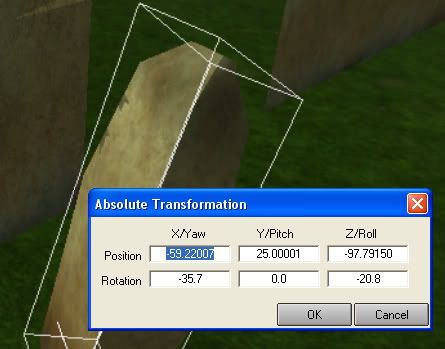
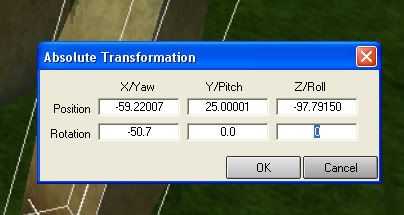
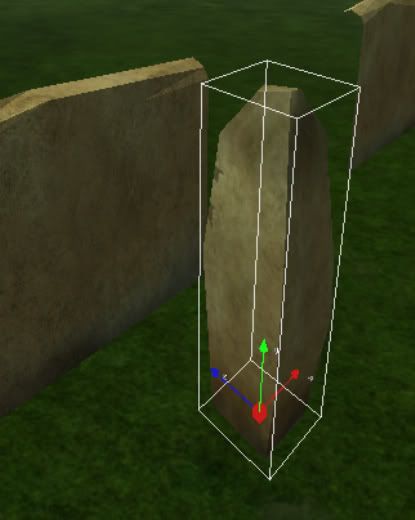
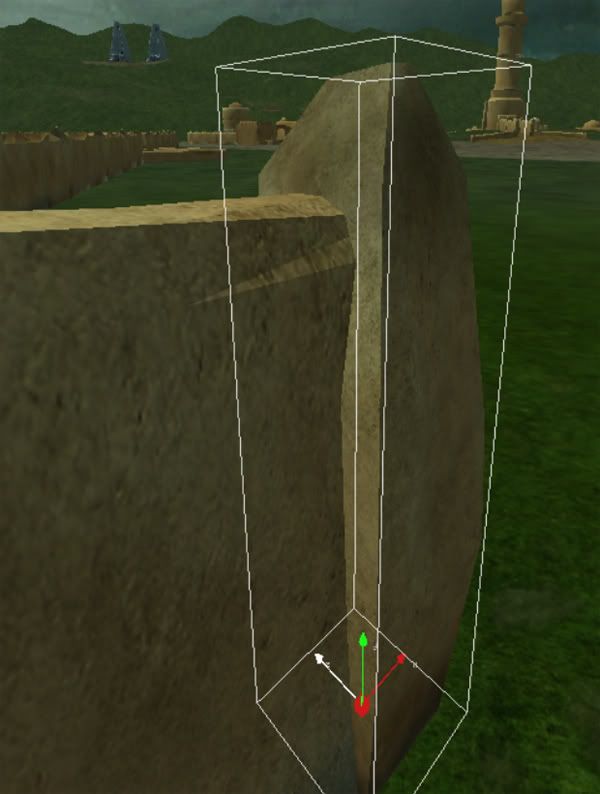
			<content type="html"><![CDATA[<p>I just had this idea to create a tutorial on how to build walls that are not alligned perfectly. <img src="https://forums.fsmod.com/img/smilies/big_smile.png" width="15" height="15" alt="big_smile" /><br />Now that more new mappers are around.<br />-</p><p>I am creating so many wall parts now - that i was forced to figure out an easy way to do it - that takes less time.</p><p>1: Here I have a wall pillar and a wall - I can clearly see that the pillar is ot of place - so how do i Allign them - When the wall is &quot;somehow different&quot; <br /><span class="postimg"><img src="http://i66.photobucket.com/albums/h251/Ejoddesert/tutorials/1.jpg" alt="http://i66.photobucket.com/albums/h251/Ejoddesert/tutorials/1.jpg" /></span></p><p>I use the arrow-pick-tool <span class="postimg"><img src="http://i66.photobucket.com/albums/h251/Ejoddesert/tutorials/arrow.jpg" alt="http://i66.photobucket.com/albums/h251/Ejoddesert/tutorials/arrow.jpg" /></span><br />So I wont be moving around stuff I don&#039;t want to move around..</p><p>2: I double click the wall - And read the numbers in the buttom table.. <br />-50.7 0.0 0.0<br /><span class="postimg"><img src="http://i66.photobucket.com/albums/h251/Ejoddesert/tutorials/2.jpg" alt="http://i66.photobucket.com/albums/h251/Ejoddesert/tutorials/2.jpg" /></span></p><p>3: I then double click the Pillar-thing - And compare the numbers - Hold a minute! It&#039;s not the same numbers! omg!<br /><span class="postimg"><img src="http://i66.photobucket.com/albums/h251/Ejoddesert/tutorials/3.jpg" alt="http://i66.photobucket.com/albums/h251/Ejoddesert/tutorials/3.jpg" /></span></p><p>4: I then memorize the numbers from the wall section - And print them into the buttom table..<br />-50.7 0.0 0.0<br /><span class="postimg"><img src="http://i66.photobucket.com/albums/h251/Ejoddesert/tutorials/4.jpg" alt="http://i66.photobucket.com/albums/h251/Ejoddesert/tutorials/4.jpg" /></span></p><p>5: press (enter) - &quot;Thats on your keyboard&quot;.. And the pillar aligns with the same coordinates as the wall peice <img src="https://forums.fsmod.com/img/smilies/big_smile.png" width="15" height="15" alt="big_smile" /><br /><span class="postimg"><img src="http://i66.photobucket.com/albums/h251/Ejoddesert/tutorials/5.jpg" alt="http://i66.photobucket.com/albums/h251/Ejoddesert/tutorials/5.jpg" /></span></p><p>6: Pull &amp; push the pillar into place with your mouse..<br /><span class="postimg"><img src="http://i66.photobucket.com/albums/h251/Ejoddesert/tutorials/6.jpg" alt="http://i66.photobucket.com/albums/h251/Ejoddesert/tutorials/6.jpg" /></span></p><p>-<br />Next you copy the pillar - hold down the&nbsp; CTRL and move the pillar in the desired direction..<br />Move with the arrows - on the Gizmo-thing - &quot;compass&quot;</p><p>Now - Copy that pillar 200 times and you have a decent wall..<br /><img src="https://forums.fsmod.com/img/smilies/tongue.png" width="15" height="15" alt="tongue" /></p>]]></content>
			<author>
				<name><![CDATA[Thomazz]]></name>
				<uri>https://forums.fsmod.com/profile.php?id=1589</uri>
			</author>
			<updated>2007-10-16T11:00:06Z</updated>
			<id>https://forums.fsmod.com/viewtopic.php?pid=85297#p85297</id>
		</entry>
</feed>